Set a PTR / Reverse DNS record for an IPv4 or IPv6 address in the external VDS/VPS Management Control Panel.
Open your server control panel
- Sign in to the client area and open Services.
- Choose the service you want to update and click Manage service.
- Find the VDS/VPS Management Control Panel section. It provides power, reboot, VNC (console), OS reinstall, backups, Reverse DNS (PTR) and other virtual-machine controls, according to your server permissions.
- Select I understand that actions in this panel can change or reinstall the VPS., then click Open full VPS control panel. The external management control panel opens in a separate tab.
Set the Reverse DNS record
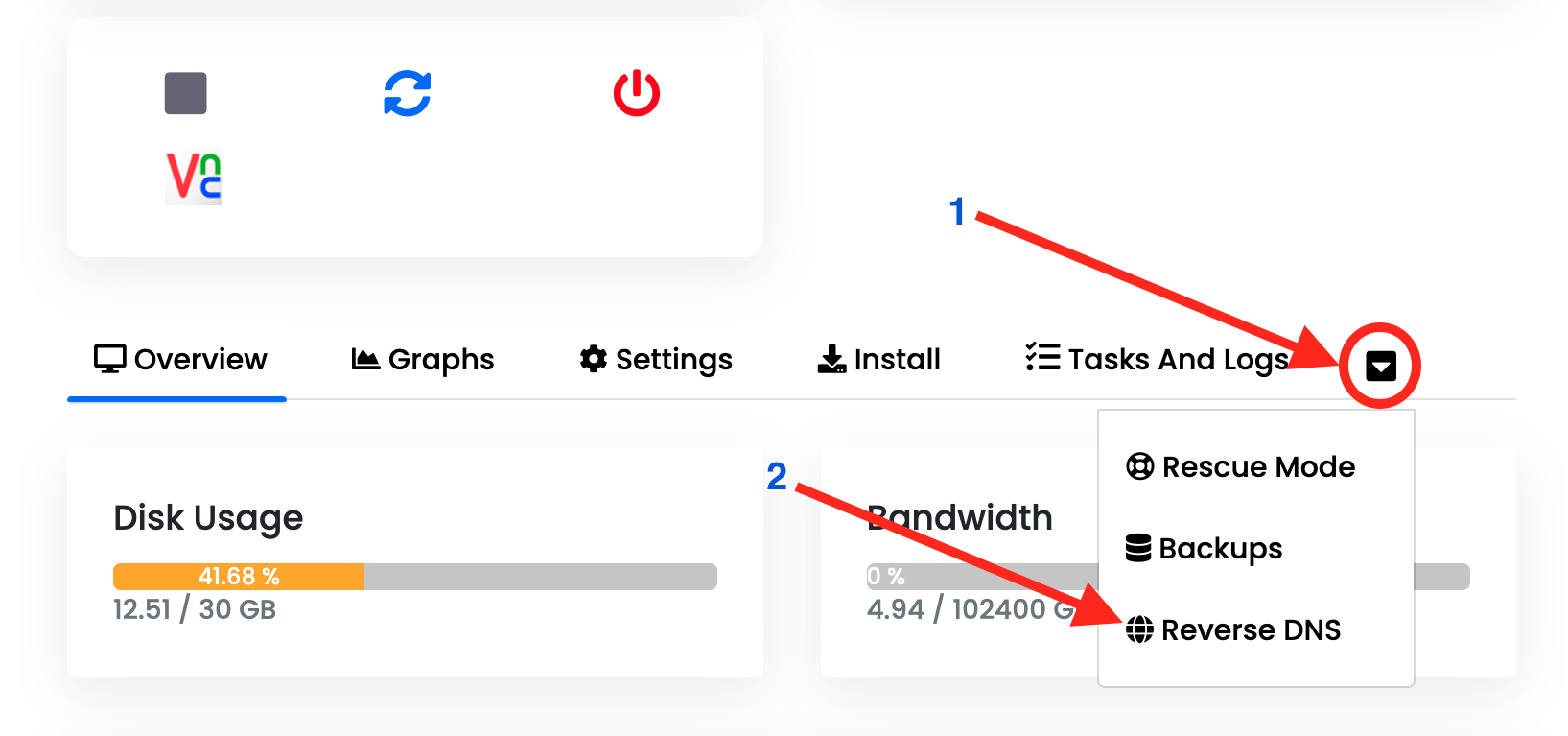
- In the external panel, open the additional options menu using the down-arrow shown as 1 below, then choose Reverse DNS, shown as 2.
- Set the PTR / Reverse DNS record for the required IPv4 or IPv6 address.
- Save and exit. Sign out of the management control panel when finished.
Where to find Reverse DNS